AI Seedance
    • Text to Video
    • Image to Video
    • Frames to Video
    • Reference to Video
    • Motion ControlNEW
    • Text to Image
    • Image to Image
    • Seedance 2HOT
    • Seedance 2.5NEW
    • Seedream 5NEW
    • GPT Image 2.5NEW
    • GPT Image 2NEW
    • HappyHorse 1.0NEW
40% OFF

Upgrade Now

Account

  • My Creations
  • Settings
AI Seedance

Create stunning AI videos and images with Seedance and Seedream models. Turn text into video, animate photos, and generate cinematic clips with synchronized audio — powered by Seedance 2.0.

Product

  • AI Video Generator
  • AI Image Generator

Resource

  • Blog

Image Models

  • Seedream 5.0 Lite
  • Seedream 5.0 Pro
  • Seedream 5.5
  • Seedream 4.5
  • Seedream 4.0
  • GPT Image 2
  • GPT Image 2.5
  • GPT Image 2.6
  • Nano Banana
  • Nano Banana Pro
  • Nano Banana 2
  • Wan 2.7 Image
  • Grok Imagine Image

Video Models

  • Seedance 2.5
  • Seedance 2.0
  • Seedance 2.0 Mini
  • Seedance 2.0 Fast
  • Seedance 1.5 Pro
  • Seedance 1.0 Pro
  • Kling 4.0
  • Kling 3.0
  • Kling 3.0 Pro
  • Kling 3.0 Turbo
  • Kling Motion Control
  • Wan 2.7
  • Wan 2.6
  • Wan 2.5
  • Grok Imagine Video
  • Grok Imagine Video 1.5

© 2026 AI-Seedance.Org All rights reserved.

Privacy PolicyTerms of ServiceRefund Policy
  1. Home
  2. AI Image Generator
  3. Seedream 5.5

Seedream 5.5

Model
*Prompt
0 / 5000
Aspect Ratio
Resolution
Background
Public Visibility
👑
Copy Protection
👑
Credits required:
4 Credits
Assets
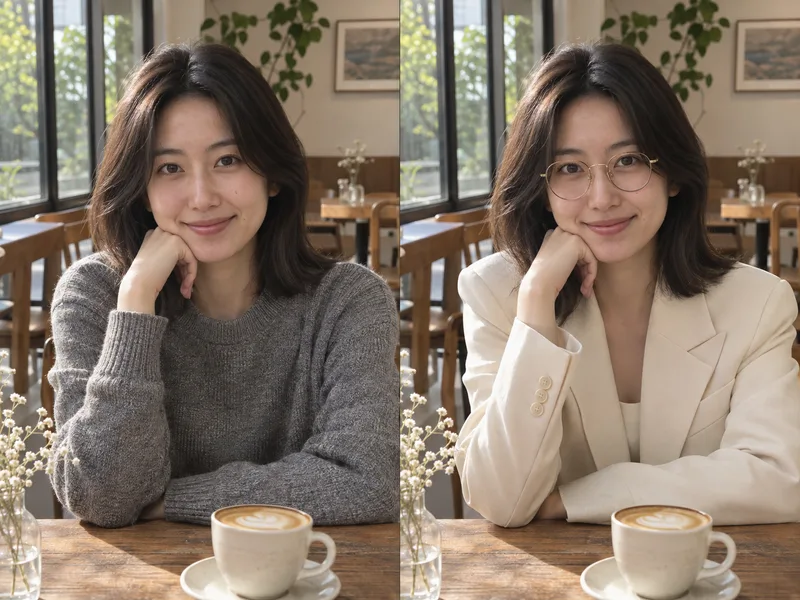
Precise Outfit Edit result

Keep her face, pose, and the cafe background the same. Replace the gray sweater with a cream blazer and add gold glasses.

Seedream 5.5 AI Image Generator for Realistic Photos and Transparent PNGs

Generate and edit images with Seedream 5.5 from ByteDance. Edit with up to 10 reference images, export transparent PNGs, and get cleaner text up to 2K.

Try Seedream 5.5 Now

Seedream 5.5 offers Text to Image and Image to Image, with up to 10 reference images for edits.

Seedream 5.5 AI image editing example: one portrait with a new outfit, face and background unchanged

What Is the Seedream 5.5 AI Image Model?

The Seedream 5.5 AI image model comes from the ByteDance Seed team, released on November 9, 2026, after Seedream 5.0 Pro. It brings steadier multi-turn editing, native transparent output, and more realistic images with sharper text. Here Seedream 5.5 runs in your browser with Text to Image and Image to Image.

Seedream 5.5 Keeps Unedited Areas Stable

Change one detail at a time and Seedream 5.5 aims to leave faces, colors, and lighting untouched.

Seedream 5.5 Outputs Real Transparency

Pick a transparent background to get a PNG with an alpha channel for stickers and cutouts.

Seedream 5.5 Renders Cleaner Text

Seedream 5.5 handles dense small print and complex lettering better on posters and labels.

Seedream 5.5 in Your Browser

No Volcano Engine API key and no setup, just a prompt and credits.

How It Works

How to Use Seedream 5.5 AI Online

Seedream 5.5 takes four steps, from a prompt or photo to a finished image.

Step 11

Choose a Seedream 5.5 Mode

Select Text to Image to create from scratch, or Image to Image to give Seedream 5.5 up to 10 reference images.

Step 22

Describe What Changes and What Stays

For edits, tell Seedream 5.5 what to change and what must stay the same, such as the face, logo, or product shape.

Step 33

Set Size, Ratio, and Background

Pick 1K, 1.5K, or 2K, one of 8 aspect ratios, and an auto, transparent, or opaque background.

Step 44

Generate and Download

Click Generate to get one Seedream 5.5 image, then download it as a PNG.

Seedream 5.5 AI Image Features for Editing, Transparency, and Text

What Seedream 5.5 does in the generator above, based on the ByteDance release.
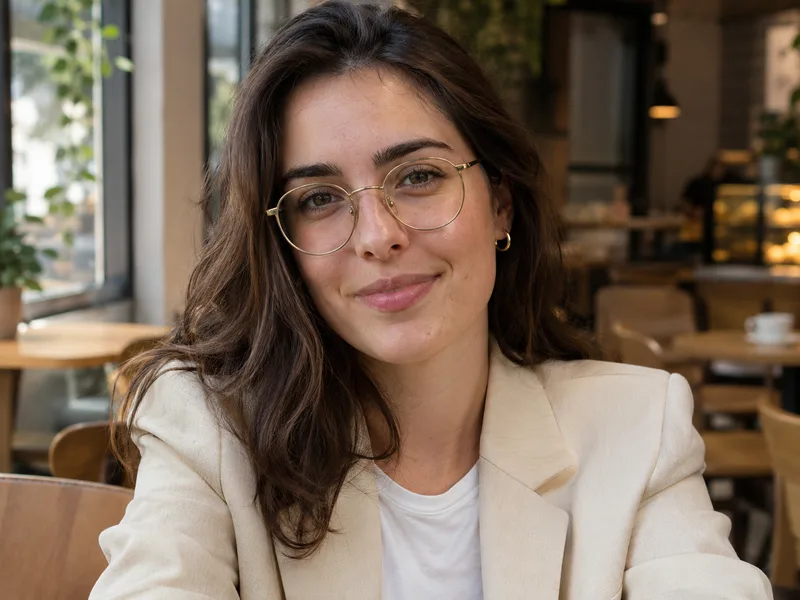
Change One Detail and Keep the Rest with Seedream 5.5
  • Change one element per edit
  • Name what stays fixed: face, pose, background
  • Light and perspective held in ByteDance's tests
Edit Photo with Seedream 5.5
Editing example: a woman in a cafe now wearing a cream blazer and gold glasses

Early Feedback on Seedream 5.5 AI

First impressions from early users.

I ran one handbag through Seedream 5.5 in six colorways. The stitching and logo plate stayed put, which saved a reshoot.

Claire Dubois

Claire Dubois, E-commerce Photo Editor

Claire Dubois

E-commerce Photo Editor

Transparent PNG straight out of the generator is what I care about. Fur edges came out soft, not jagged, so less cleanup before printing.

Kofi Boateng

Kofi Boateng, Sticker Shop Owner

Kofi Boateng

Sticker Shop Owner

I asked Seedream 5.5 to swap a jacket for a cream blazer on one portrait. The face and background held. The hands shifted on the first try, so I ran it again.
Mei Chen

Mei Chen, Fashion Stylist

Mei Chen

Fashion Stylist

It got a dense chart legend right on the second try. One label had a swapped letter, so I proofread, but it is much closer than before.

Daniel Cho

Daniel Cho, Infographic Designer

Daniel Cho

Infographic Designer

I asked Seedream 5.5 to change the sofa, then the rug, then the wall color in one room. Lighting and perspective stayed consistent.

Priya Sharma

Priya Sharma, Interior Designer

Priya Sharma

Interior Designer

I could not get a Dreamina account working from Italy. Seedream 5.5 here just ran, and the button shows the credit cost first.

Luca Bianchi

Luca Bianchi, Freelance Illustrator

Luca Bianchi

Freelance Illustrator

Seedream 5.5 Questions and Answers

Where to use it, cost, editing, transparency, text, and commercial use, answered.


Create Your First Seedream 5.5 AI Image

Open the generator, pick a mode, and test it with your own prompts and photos.

Start with Seedream 5.5See Credit Plans