AI Seedance
    • Text to Video
    • Image to Video
    • Frames to Video
    • Reference to Video
    • Motion ControlNEW
    • Text to Image
    • Image to Image
    • Seedance 2HOT
    • Seedance 2.5NEW
    • Seedream 5NEW
    • GPT Image 2.5NEW
    • GPT Image 2NEW
    • HappyHorse 1.0NEW
40% OFF

Upgrade Now

Account

  • My Creations
  • Settings
AI Seedance

Create stunning AI videos and images with Seedance and Seedream models. Turn text into video, animate photos, and generate cinematic clips with synchronized audio — powered by Seedance 2.0.

Product

  • AI Video Generator
  • AI Image Generator

Resource

  • Blog

Image Models

  • Seedream 5.0 Lite
  • Seedream 5.0 Pro
  • Seedream 5.5
  • Seedream 4.5
  • Seedream 4.0
  • GPT Image 2
  • GPT Image 2.5
  • GPT Image 2.6
  • Nano Banana
  • Nano Banana Pro
  • Nano Banana 2
  • Wan 2.7 Image
  • Grok Imagine Image

Video Models

  • Seedance 2.5
  • Seedance 2.0
  • Seedance 2.0 Mini
  • Seedance 2.0 Fast
  • Seedance 1.5 Pro
  • Seedance 1.0 Pro
  • Kling 4.0
  • Kling 3.0
  • Kling 3.0 Pro
  • Kling 3.0 Turbo
  • Kling Motion Control
  • Wan 2.7
  • Wan 2.6
  • Wan 2.5
  • Grok Imagine Video
  • Grok Imagine Video 1.5

© 2026 AI-Seedance.Org All rights reserved.

Privacy PolicyTerms of ServiceRefund Policy
  1. Home
  2. AI Image Generator
  3. GPT Image 2.6

GPT Image 2.6

Model
*Prompt
0 / 32000
Output Format
Mode
Aspect Ratio
Resolution
Output Image Number
Quality
Background
Public Visibility
👑
Copy Protection
👑
Credits required:
5 Credits
Assets
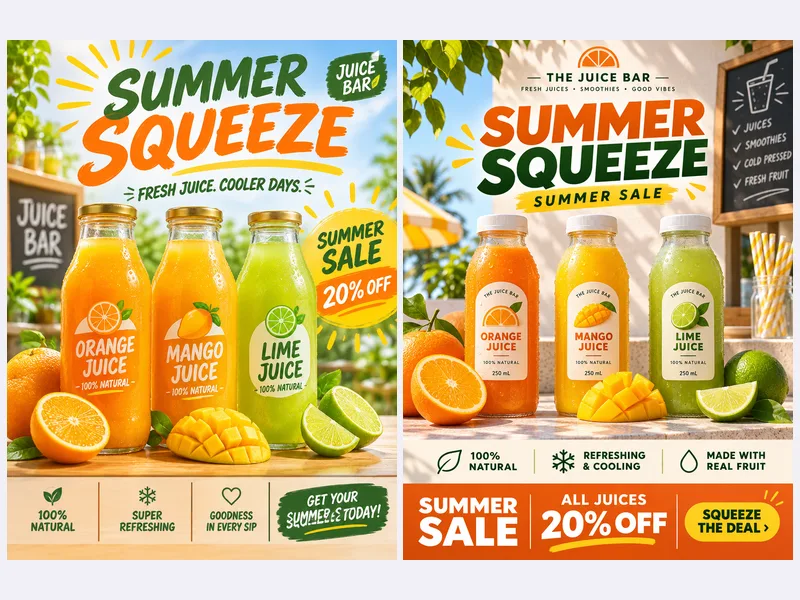
Flare vs Sunburst Poster result

A juice bar summer sale poster, bold headline SUMMER SQUEEZE, three bottles of orange, mango and lime juice on a sunlit counter, clean grid layout.

New: OpenAI released GPT Image 2.6 on November 4 – try Flare and Sunburst now

GPT Image 2.6 Generator for 4K Images, Looping GIFs and SVG Logos

Write a prompt or add up to 16 reference images, pick Flare for speed or Sunburst for detail, and export a PNG, a looping GIF or an SVG. No OpenAI account or API key needed.

Generate with GPT Image 2.6

Tip: test a layout in Flare, then switch to Sunburst for the final render.
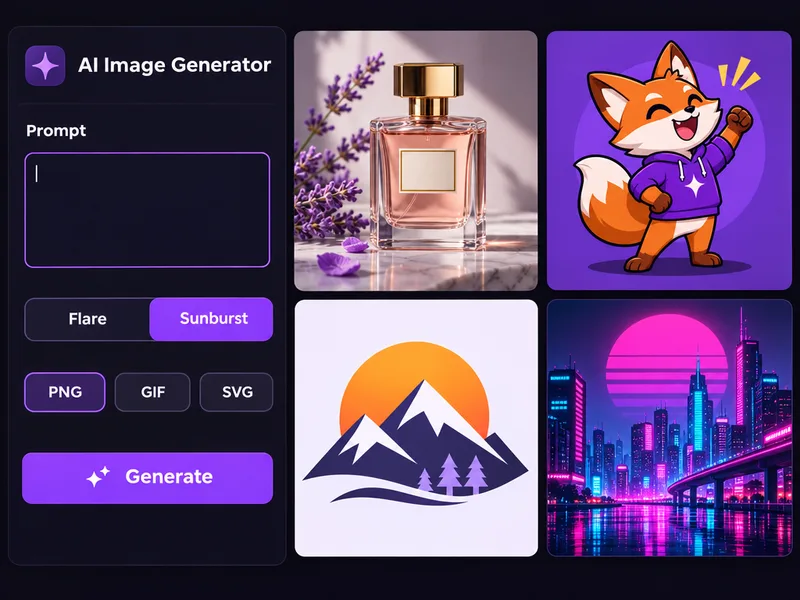
GPT Image 2.6 generator with the Flare and Sunburst switch and PNG, GIF and SVG formats

What Is GPT Image 2.6?

GPT Image 2.6 is OpenAI's image model released on November 4, 2026, called Images 2.6 in ChatGPT and gpt-image-2.6 in the API. It ships as two models, Flare for fast drafts and Sunburst for detail and consistency, and it is the first GPT Image release that returns looping GIFs and SVG vectors as well as PNGs. OpenAI says it is about 50% faster than GPT Image 2.5.

Two models in one form

Flare for fast posters and layouts. Sunburst for fine detail and steady characters across edits.

Three output formats

Export a 4K PNG, a looping GIF with 4, 8 or 12 frames, or a static SVG vector from a text prompt.

Up to 16 reference images

Lock in a product, face or style with up to 16 JPG, PNG or WEBP files.

Long, precise prompts

Prompts up to 32,000 characters hold full art direction and copy.

How It Works

How to Use GPT Image 2.6 in 4 Steps

From prompt to finished PNG, GIF or SVG, with the cost shown first.

Step 11

Choose Text to Image or Image to Image

Use Text to Image to start from words, or Image to Image to upload up to 16 reference images.

Step 22

Write your prompt and pick Flare or Sunburst

Describe the subject, style, text and layout. Select Flare for fast drafts or Sunburst for detailed final images.

Step 33

Set the format, size and ratio

Choose PNG at 1K, 2K or 4K, GIF with 4, 8 or 12 frames, or SVG in Text to Image, then pick a ratio and quality.

Step 44

Generate and download the file

Check the credit cost on the Generate button, click it, and download your result as a real PNG, GIF or SVG file.

GPT Image 2.6 Features You Can Use Here

Every setting below is live in the generator above.

Switch Between Speed and Detail Without Leaving the Form
  • Flare for fast concepts, menus, flyers and variations
  • Sunburst for hero visuals, campaign series and retouching
  • Sunburst uses more credits per image than Flare
Try GPT Image 2.6 Free
Juice bar poster as a quick Flare draft beside a detailed Sunburst render

What Early GPT Image 2.6 Users Say

First impressions from the days after the November 4 release.

I didn't want to wait for GIF to reach my ChatGPT account. Here I made a looping 8 frame wave for our mascot in a few tries. Slow speed looked most natural.

Sofia Martinez

Sofia Martinez, Social Media Manager

Sofia Martinez

Social Media Manager

SVG is why I tried GPT Image 2.6. Two of six icon ideas went straight into my site; the rest needed some path cleanup in Figma.

Kwame Mensah

Kwame Mensah, Indie Web Developer

Kwame Mensah

Indie Web Developer

I uploaded five photos of our ceramic mug for a kitchen scene. Sunburst kept the glaze color and handle shape right, which older tools missed.

Priya Sharma

Priya Sharma, E-commerce Store Owner

Priya Sharma

E-commerce Store Owner

This week it's Flare for rough layouts, then Sunburst once the client picks a direction. Seeing the cost on the button keeps budgets honest.
Daniel Kim

Daniel Kim, Freelance Brand Designer

Daniel Kim

Freelance Brand Designer

Transparent background and 4K is what print stickers need. I made twelve food characters in an afternoon and almost every border came out clean.

Claire Dubois

Claire Dubois, Sticker Shop Owner

Claire Dubois

Sticker Shop Owner

I'm not a designer. I typed our breakfast menu and got a readable chalkboard poster. I fixed one spelling and printed it the same day.

Marcus Johnson

Marcus Johnson, Cafe Owner

Marcus Johnson

Cafe Owner

GPT Image 2.6 FAQ

Flare vs Sunburst, GIF, SVG, references, API and pricing.


Create Your First GPT Image 2.6 Image

Choose Flare or Sunburst and export a 4K PNG, a looping GIF or an SVG logo. Need more motion? Turn your still into a video next.

Try GPT Image 2.6Animate an Image to Video