Guide camera paths, skeletal poses, and object trajectories to create AI videos with exact motion control — powered by Kling AI.
Use camera path mode for cinematic sweeps or skeletal pose mode for character-driven animation.
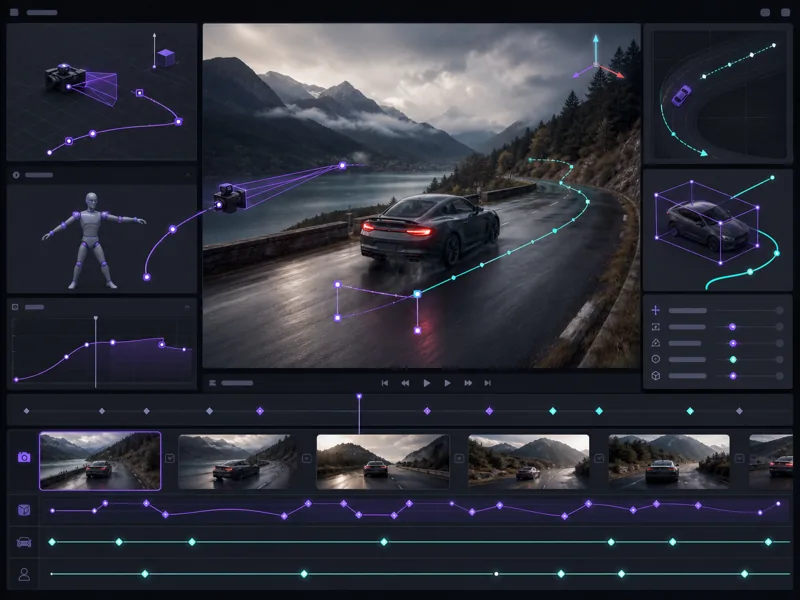
Kling Motion Control gives you director-level authority over AI video generation. Define camera sweeps, character poses, object trajectories, and motion transfers — then generate videos that follow your exact creative direction.
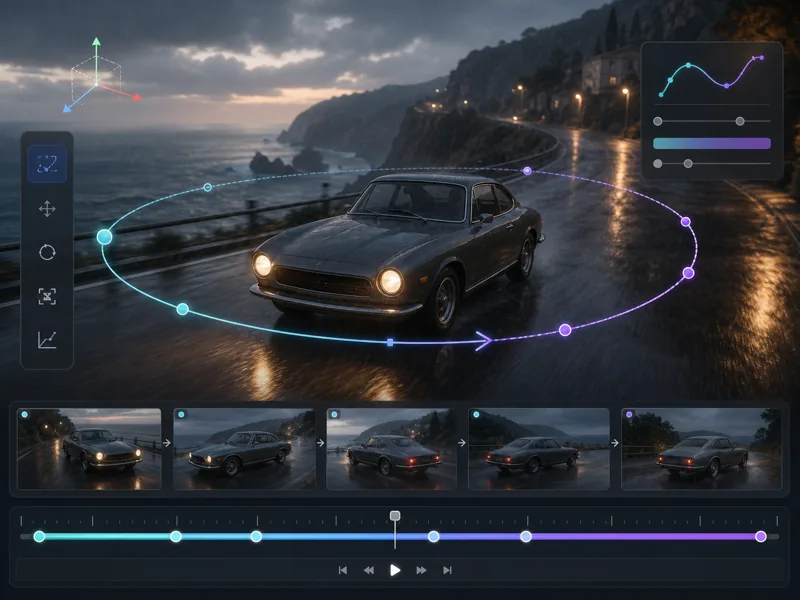
Define precise camera movements — pan, tilt, zoom, orbit, and dolly — using keyframe-based path editing for cinematic results.
Control character body movement frame by frame using skeletal pose inputs for natural, repeatable human animation.
Extract motion from any reference video and apply it to your AI-generated subjects for consistent, realistic movement.
Draw movement trajectories directly on the canvas to guide where objects and characters travel through the scene.
From source upload to final export — create precise AI video animations with full motion control.
Select a high-quality source image or reference video clip. Clear subject separation and good lighting produce the best motion control results.
Choose your motion mode — camera path, skeletal pose, trajectory drawing, or reference transfer. Define keyframes, draw paths, or upload a reference clip.
Click Generate and let the AI produce a video where subjects follow your defined motion precisely. Review the result in the preview player.
Adjust motion intensity, duration, or paths if needed. Download the final video in your preferred resolution and format.
Advanced motion control tools for precise AI video generation with camera, pose, and trajectory guidance.
Animators, filmmakers, and video creators on their experience with Kling Motion Control workflows.
The camera path editor changed my workflow completely. I set up a complex orbital shot with zoom in about 2 minutes — previously that took half a day in After Effects with manual keyframing.
Liam Harrington
Motion Graphics Designer
Skeletal pose guidance in Kling Motion Control is remarkably precise. I uploaded a dance reference, mapped the poses, and got clean animation on the first generation. Multi-person scenes work better than I expected.

Yuki Tanaka
Character Animator
I use the trajectory drawing tool daily for product videos. Drawing the path for a product to fly across screen takes seconds, and the result looks professionally animated every time.

Elena Vasquez
Social Media Video Producer
Reference motion transfer is the feature I use most. I film a quick phone video of the movement I want, upload it, and the AI applies that exact motion to my generated characters. Saves weeks of VFX work.

James Okafor
Independent Filmmaker
Our team produces 20+ social clips per week using Kling Motion Control. The path-based animation tool alone cut our turnaround from 3 days to under 4 hours per batch.

Rachel Chen
Digital Content Director
I was skeptical about AI motion control replacing manual work, but the skeletal pose system is genuinely production-ready. We used it for 12 shots in our latest short film — consistent quality throughout.
Marco Bellini
VFX Supervisor
Common questions about Kling Motion Control AI video generation answered.
Generate AI videos with precise camera paths, skeletal pose guidance, and motion transfer — directly in your browser.